Welcome to Percona Cloud Tools Documentation!
PCT is a hosted service that helps you manage MySQL performance. It provides insight into problematic queries and performance spikes that you may not notice with other tools.
How PCT Works
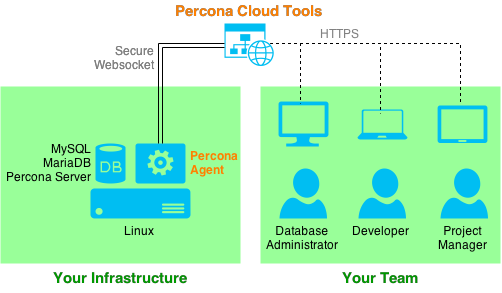
Data is collected using Percona Agent: a free, open-source, single-binary application. You can install Percona Agent on any Linux server with one command. The agent runs as a background service and connects to PCT through a secure websocket. Collected MySQL metrics and other performance data is stored where only you and members of your team can access it. You can access the web application to analyse your data at cloud.percona.com using any browser that supports HTTPS.
Quick Start
If you have MySQL server running and configured correctly, setting up PCT is as easy as running a single command.
To start using PCT:
Go to cloud.percona.com, create a PCT Account and log in.
Get your API key at cloud.percona.com/api-key.
Log in to your MySQL server as root and run the following command:
$ curl -s https://cloud.percona.com/install | bash /dev/stdin -api-key="<API key>"
Check out this video to see how easy it is to get started
For more information about the requirements and install options , see the Percona Agent section.
Contents
- PCT Account
- How to create and manage your PCT Account.
- Percona Agent
- How to install, manage, update, and uninstall Percona Agent.
- Web Interface
- Understanding the general layout of the web UI.
- Performance
- How to get a quick overview of your infrastructure.
- Metrics Monitor
- How to use the Metrics Monitor tool.
- Query Analytics
- How to use the Query Analytics tool.
- Configuration
- How to configure PCT.
Help and Support
- If you’re a Percona Support customer, get help through the Percona Customer Portal.
- For bugs, please create an issue at https://jira.percona.com.
- For everything else, please ask, share, and help others on the Percona Cloud Tools Community Forum.